Superbuy Shipping Calculator: Enter a Parcel You Can Actually Compare
The Superbuy shipping calculator is useful when its inputs describe the parcel you intend to send. If the destination is correct but the weight describes loose goods and the dimensions describe a different box, the resulting comparison starts from an inconsistent parcel.
This guide explains how to prepare and interpret those inputs. It does not calculate a live quote on this page. Keep the result with its date and assumptions, and update it when your parcel changes.
Start with the displayed units
In a September 2026 inspection, Superbuy's public freight estimator showed destination, warehouse, weight in grams, length, width and height in centimetres, and item category. Read the units before typing rather than relying on the units used in a shopping list.
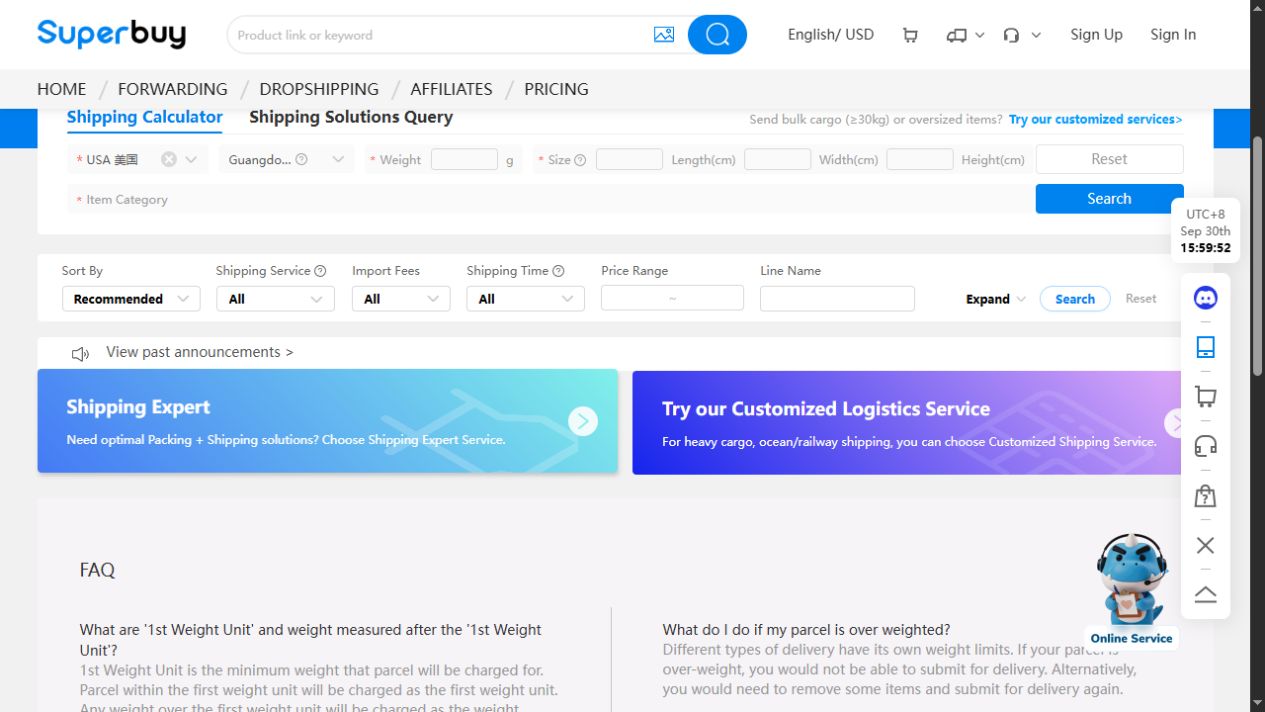
The September 30, 2026 view above has USA selected, but its weight, dimensions and item category are still empty. It illustrates where to enter the parcel details, not an available shipping quote. Complete those fields before interpreting the results area.
For example, a hypothetical parcel weighing 2.4 kg corresponds to 2,400 g. Entering 2.4 into a field labelled grams would describe a different weight. Likewise, 300 mm is 30 cm, not 300 cm. These are unit-conversion examples, not measurements or quotes for an actual shipment.
Record the units beside every saved measurement. This prevents a later comparison from reusing a number while losing its meaning.
Distinguish an early estimate from a packed measurement
Before your goods arrive, you may only have approximate item weights or a possible box size. Keep that uncertainty visible in your own planning notes. Do not describe an estimate as a measured parcel merely because the calculator accepts the input.
After packing is determined, use the information for that packed parcel. Product weight alone may not describe everything being sent. Conversely, adding every original box dimension together is not a reliable way to predict the final outer dimensions.
The warehouse guide explains the stages before dispatch. The shipping guide connects those measurements to the later route choice.
Understand why dimensions can affect the result
Superbuy's estimator FAQ discusses volume-based charging and presents a general example using a divisor of 6,000. That example is not proof that every available service uses the same divisor, rounding or charging rule.
As a hypothetical calculation, a 40 × 30 × 20 cm box has a volume of 24,000 cubic centimetres. Dividing that volume by 6,000 gives 4 kg. This illustrates that formula only; it is not a live route quotation or a claim that a specific carrier will bill this parcel at 4 kg.
Read the actual service's stated rules before choosing which weight applies. Do not replace them with a universal formula copied from a guide.
Keep the contents accurate
Choose inputs that describe the actual goods. A category that produces a convenient result is not the right category if it omits relevant components or characteristics.
A displayed category does not itself override a prohibition or prove that an item is accepted. If you cannot classify the exact product confidently, ask about it before relying on a quote or placing an order. The other-items guide explains why product identity and transport acceptance must be kept separate.
Change one assumption at a time
If you want to understand a price difference, compare the same parcel under the same conditions first. Then change one input or one service and record what changed. Altering weight, box size and destination together makes it difficult to identify the reason for a different result.
Do not compare a current packed-parcel quote with another shopper's historical amount as though they were controlled alternatives. Their contents, service conditions, currency or additional charges may differ.
For a useful saved comparison, include:
- The date, destination and warehouse.
- Weight, dimensions and units.
- Contents and the relevant item classification.
- Exact service name and displayed currency.
- Quoted amount and separately listed charges.
- Whether the parcel data are estimated or measured.
Read a missing result as a question, not a verdict
If no service appears, first check the form for missing values, unit mistakes and obvious inconsistencies. Then check whether the query completed. A page that failed to load is different from a completed result indicating no available option.
Do not repeatedly select inaccurate categories until a result appears. Ask about the exact parcel if the reason remains unclear. A blank screen does not establish that every route is unavailable, and a returned price does not establish that every shipping condition has been satisfied.
Refresh the quote when the shopping plan changes
Adding footwear, changing packaging or removing items can make an earlier estimate unsuitable. If you are still choosing products, keep that work separate from the quote: this white red-star trainer page on OG is a product-browsing destination, not a calculator or verified parcel measurement.
Preserve selected products through spreadsheet links and organise them in the Superbuy spreadsheet. The best spreadsheet guide helps prioritise comparable information, while the ordering guide connects product and parcel stages.
Before committing, revisit the quoted service's conditions and distinguish estimated delivery from a promise. Use the delivery-time guide, review guide and safety guide to check the remaining assumptions rather than treating a calculator result as the end of the decision.