Superbuy QC Photos: Decide What the Image Actually Answers
Superbuy QC photos are useful when they answer a question about the item you ordered. Start with the product reference and selected option, then identify what each photograph lets you inspect. Do not turn a familiar-looking image into approval of everything about the product.
To find photos of your own received items, open My Warehouse in your Superbuy account and select the matching item record. Superbuy's shopping-agent guide places inspection and photography after warehouse arrival. Keep that record beside your selected colour, size and quantity when checking the images.
Match the image before judging the item
Connect the image to the correct order, colour, size and quantity. If several similar items are in your warehouse, do not rely on the photograph's position in a gallery to identify them.
Compare the expected option with the visible label and relevant features. An unclear label should lead to a clearer image or enquiry, not a guess based on another product's photo.
Keep that identity in the Superbuy spreadsheet. The spreadsheet links guide helps preserve the original listing when a later warehouse observation is added.
Give each image one clear question
Ask a question the angle can answer. For a garment, you might inspect the selected colour, visible seam or included pieces. For a shoe, you might check the size label or a particular surface detail.
A hypothetical jacket review could need three different observations: whether the selected size label is present, whether the lining shown belongs to the received garment, and whether a visible mark is damage or lighting. One distant front view may answer none of those reliably.
Do not replace the questions with a blanket “looks good.” The useful outcome is a specific observation that supports the next decision.
Read measurement photos from both ends
If an image includes a ruler or tape, identify the measurement's start and end points and read the unit. A number alone may refer to the wrong dimension.
Check whether the garment is positioned as expected and whether the relevant edge is visible. For footwear, distinguish an outsole measurement from the space available inside. Compare like with like using the size guide.
If a crucial point is obscured, ask for a view that resolves it. Do not invent the missing centimetres from perspective or assume a size label is an exact measurement.
An insole photograph without an insole measurement
In a historical community QC thread inspected on 1 October 2026, a buyer complained that an insole had been photographed without a measurement. The displayed image shows a single insole on a blue background, but no ruler or tape. It carries a Superbuy mark and a 10 January 2024 timestamp; those visible markings are context, not independent authentication of the order.
A Superbuy-named account replied that the request had asked for an insole photograph rather than a measurement, and the author acknowledged the distinction. This exchange illustrates why the wording matters, not a universal service rule or a proven resolution. Request the heel-to-toe measurement with a readable scale and both endpoints in view. The pictured insole cannot establish a length, fit, or the dimensions of the OG footwear linked below.
Request a useful additional view
In the 1 October 2026 pricing-page capture, the Detailed Photo card displays US$0.33/PCS. That is a dated description of an additional photography service, not a universal inspection allowance. Check the selected request’s charge and scope before confirming it; the image does not show an inspected customer order.
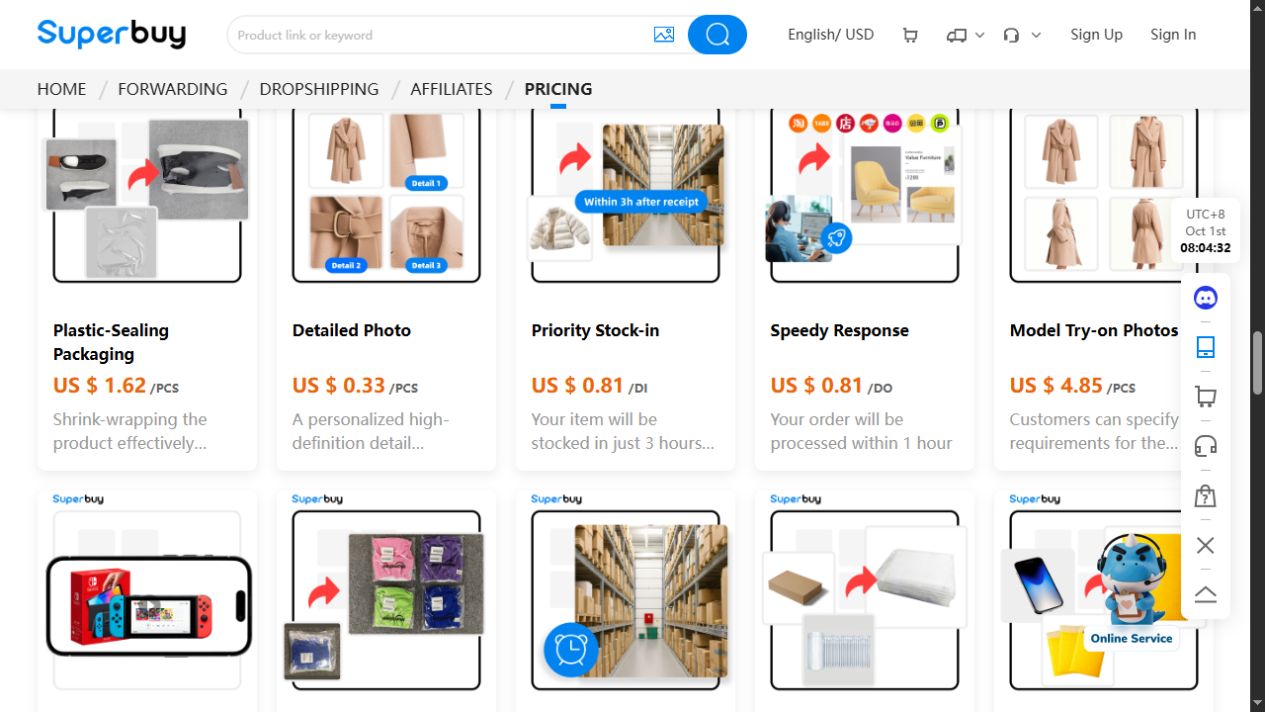
A good request identifies the item and the feature that needs clarification. For example: show the same seam from closer range, include both ends of the tape, or show the relevant label without cropping it.
Before submitting the request, confirm the available views, any charge and the stated timing for that item. Describe the detail you need rather than asking for an unspecified set of extra pictures.
The support guide helps turn an uncertain observation into a concise enquiry. Retain the reply with the same item rather than applying it to every product in the order.
Turn a concern into a precise photo request
Use the feature you need to decide about as the starting point. These are example requests, not observations from a completed order:
| Your question | Useful request | What to compare afterward |
|---|---|---|
| Is this the selected size? | Show the size label clearly on this item | The label and the size saved in your order |
| Is the shirt long enough? | Lay it flat and show a tape from the chart's stated start point to the hem | The same measurement on your reference garment |
| Is that mark damage or glare? | Photograph the marked area from another angle with the area identified | Whether the mark remains visible across the views |
| Did both pieces of the set arrive? | Show the top and bottom together and their labels separately | The contents and sizes of the purchased option |
Keep a measurement request and a colour request separate when they need different views. Once a reply answers the original question, record the result and move on; more near-identical photographs do not necessarily improve the decision.
Know what a photo cannot establish
An image may show a visible mark without explaining its cause. Lighting can influence colour appearance. A photograph cannot establish comfort, long-term durability or hidden construction just because the surface looks convincing.
Likewise, do not treat photos as an authenticity certificate. Keep any conclusion within the evidence available for the actual item.
The spreadsheet review explains the difference between an observation and a broader claim, while the safety guide covers decisions that require more than product imagery.
Use QC finders and checkers as leads, not substitutes
If you search for a Superbuy QC finder or checker, establish what the service actually returns. A tool may surface images from a different order or a similar listing. Match the product and option before applying any observation to yours.
Repeated copies of the same image do not create independent confirmation. Nor does an automated label explain whether the photo shows the feature that matters to your purchase.
For a footwear candidate, browse this product detail on OG Spreadsheet to identify the option you want. This fixed link does not retrieve QC images or certify the item.
Move to parcel planning only after the relevant questions
Resolve an important mismatch before treating the item as ready for shipment. Keep purchase questions separate from packing decisions; protective packaging cannot correct an incorrect size.
Use the warehouse guide for the item stage and the shipping guide for the later parcel. The ordering guide connects the stages, and the best spreadsheet guide explains how a useful list makes unresolved questions visible.
Can I share my QC images publicly?
Review them for order numbers, addresses, account details and other private information first. Also consider whether you have permission to reuse images that belong to someone else.
Does a clear photo prove the item will fit?
No. Use relevant measurements and the intended fit, not image sharpness alone.
What if two photos seem inconsistent?
Check that they show the same item and option, then ask about the specific difference. Do not choose whichever image supports the conclusion you wanted.